
Every Salesforce ORG you work on, under control.
ORGanizer for Salesforce tells your ORG tabs apart at a glance, keeps the logins you use every day within reach, and puts a developer console, an ORG health dashboard and a permission explorer one keyboard shortcut away.
Ten years in, and turning
ORGanizer shipped in 2016. Ten years later the Salesforce ecosystem looks very little like it did then — and the way all of us interact with the CRM is about to change far more dramatically still.
ORGanizer intends to follow that curve rather than outlive it. So don't be surprised if the coming releases move key features around, retire some of them, or introduce things nobody has asked for yet because nobody has needed them yet. That is the plan, not an accident.
It is also exactly what pushed this release out of beta at last. 1.0 asks for far fewer permissions by default, rebuilds local encryption from the ground up, and is a good deal more explicit about how the extension should — and should not — be used at work.
With great power comes great responsibility. You are a power user: use the tools you have responsibly, inside your own rules of engagement and whatever you have signed.
Stop guessing which tab is production.
ORGanizer lives in your browser toolbar. It paints every ORG tab with its own colour and title, remembers the Salesforce users you sign in with, and gives you a set of tools that would otherwise mean a dozen setup pages.
Tell your ORG tabs apart
Six open tabs, all called Salesforce. ORGanizer gives every ORG its own tab title and favicon colour, so a sandbox never looks like production again. This is the feature people install it for, and it is still the one that saves the most damage.

before

after
Your everyday dev logins, one click away
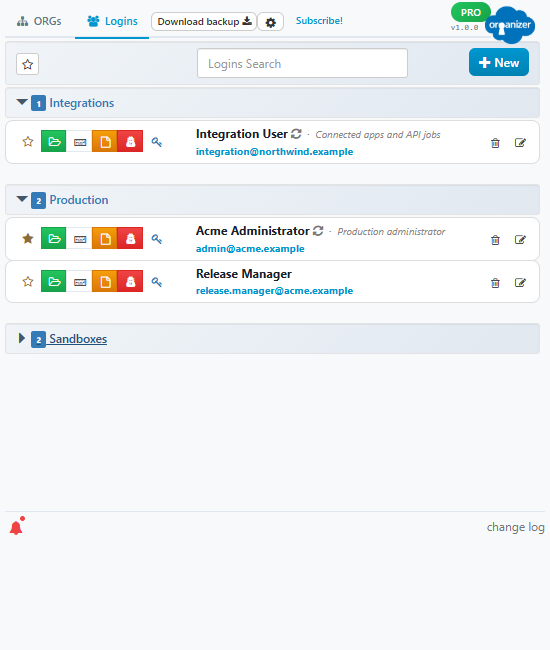
Scratch orgs, developer editions, sandboxes, the handful of test users you rotate through — save them once, grouped by customer or project, and open any of them in a tab, a window or a private session with a single click. Passwords and security tokens are encrypted with a key derived from your own passphrase, and that key never leaves the extension's background worker.
Where to draw the line
ORGanizer is a productivity tool, not a certified password manager, and storing credentials was never the point of it. No browser extension is 100% secure. Keep production admin accounts, anything covered by an NDA and anything your company's security policy has an opinion about in the vault your organisation approved — and use ORGanizer for the development and test environments where that is not a concern. Which, for most of us, is where most of the day goes anyway.
Your whole link library, one shortcut away
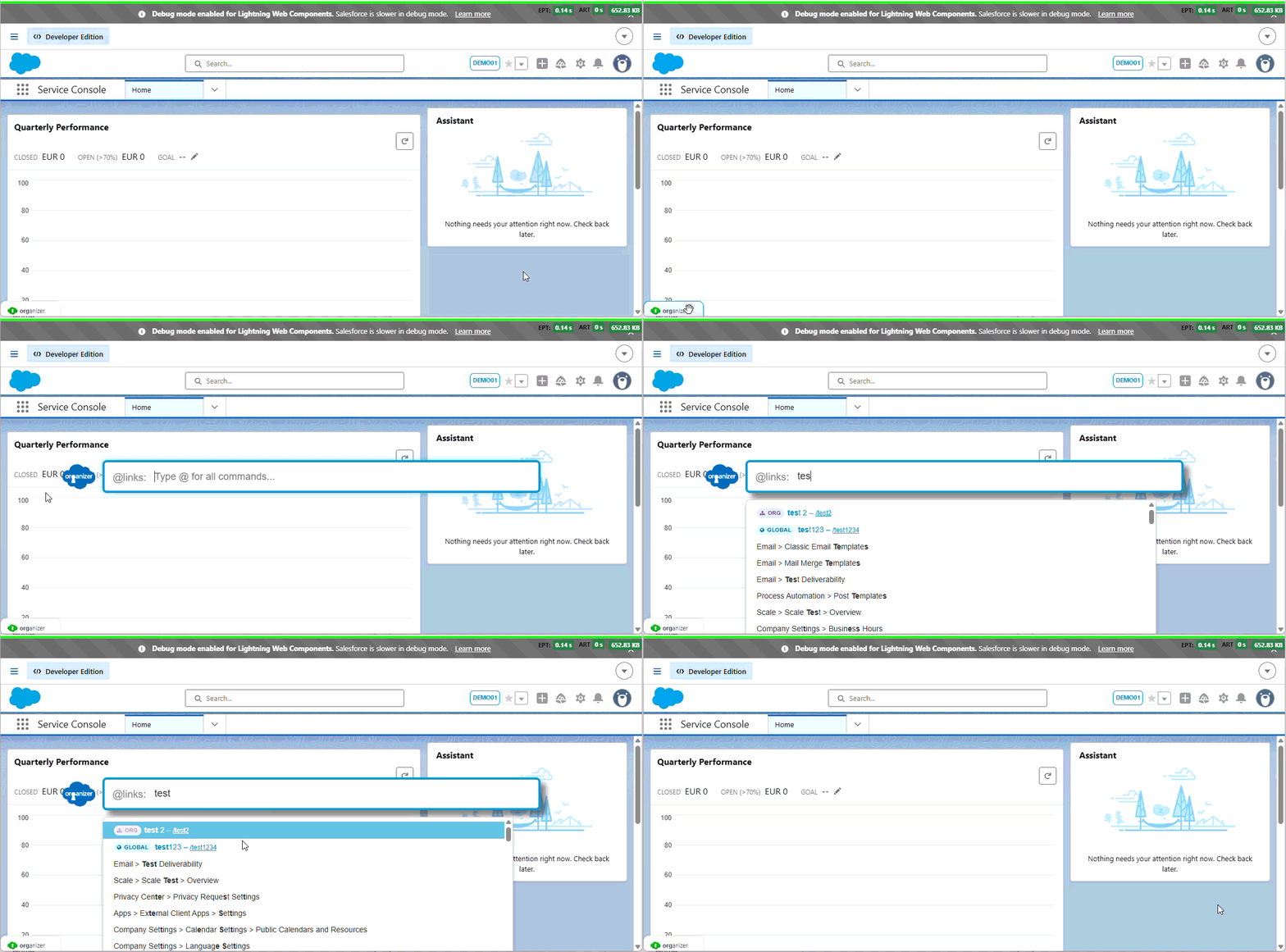
Quick Links turns CTRL + SHIFT + SPACE into a command palette for Salesforce: setup pages, object setup pages, metadata components, any relative path you type, global search, and your own custom links. Those links can be global or scoped to specific ORGs, and there is a scratch list for the handful of pages you are bouncing between today.
A developer console that opens instantly
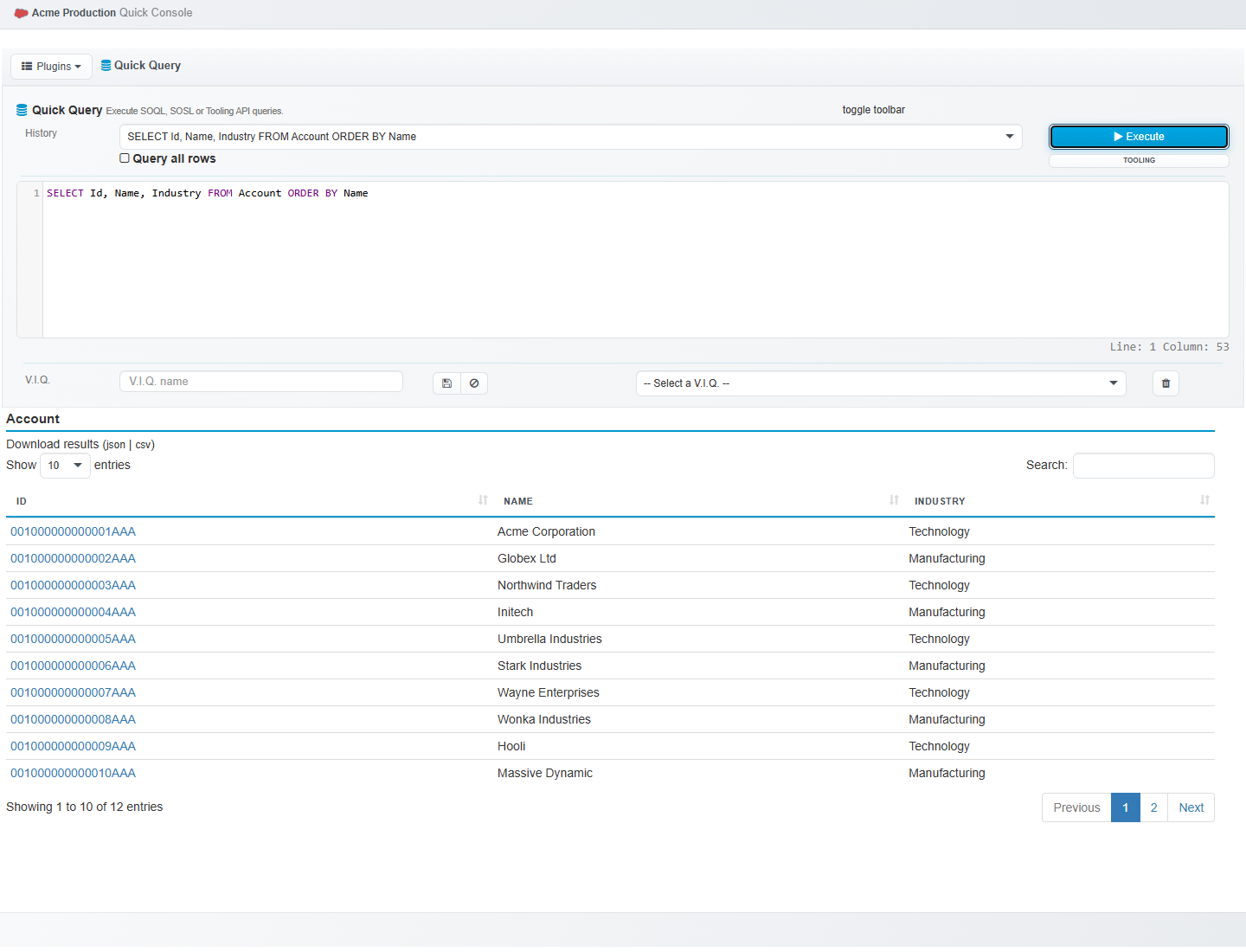
The Quick Console runs SOQL, SOSL and Tooling API queries, executes anonymous Apex, edits records field by field, describes your ORG, converts Salesforce Ids and logs you in as another user — without leaving the page you are on. Need room to work? Open it in a dedicated full-screen tab.
Out of beta, with two new tools and a much smaller footprint
1.0 adds an ORG health dashboard and a permission explorer, rebuilds the encryption on the Web Crypto API, and asks for access to your Salesforce domains only when you actually open one.
-
Health Monitor
Seventeen sections of ORG health — limits, storage, async jobs, Apex tests, licences, automation, security signals and more — rolled into one Health Score, with a live limits monitor and a report you can hand to a customer.
-
Access Lens
Answer “why can this user see that?” Access Lens resolves object, field and system permissions down to the profile or permission set that granted them, flags elevated access and compares two users side by side.
-
Quick Console in a tab
The same console, in a full browser tab instead of an overlay — room for long queries, wide result sets and debug logs, and it stays open while you navigate the ORG.
-
Rebuilt encryption
PBKDF2-SHA256 over 600,000 iterations, AES-GCM 256-bit with per-value authentication, and a key held only in memory. It raises the bar considerably — it does not turn a browser extension into a corporate vault, so keep the credentials your policy cares about where your policy wants them.
-
Fewer permissions, and you grant them
No Salesforce access at install time: ORGanizer asks for the domains of the ORG you just opened, one ORG at a time, and you can revoke any of them. The list itself is shorter too — access to your identity, your email address, your clipboard and your browsing history is gone.
-
A rebuilt interface
The popup, the Options page and the Quick Console were redesigned around the work rather than around the old markup: grouped settings instead of one long list, proper dark mode throughout, clearer states, and gauges that no longer need a charting library to draw a percentage.
-
And the small things
The ORGanizer button now docks to any of the four page edges and can be dragged along the one it is on. Quick Links became one synced list whose entries can be global or scoped to specific ORGs. And configuring ORGs and links moved into the Options page, with a filter, an editor and bulk delete instead of a cramped popup panel.
Install ORGanizer for Salesforce
Free, no account required. The same build runs on Chrome, Firefox and Edge.
 Chrome
 Web Store
Chrome
Chrome Web Store
 Firefox
Mozilla Add-ons
Firefox
Mozilla Add-ons
 Edge
Microsoft Add-ons
Edge
Microsoft Add-ons
Made by one person, with a lot of help
ORGanizer has been shaped by the people who use it. For more than ten years the support form has been collecting bugs, ideas and change requests from the Salesforce community — and a large part of what the extension does today started as one of those messages. If something is missing or in the wrong place, that is still the way in.
Graphic designers
They created the logo and helped me with the CSS stuff. Thanks for your #awesome job!
Alpha testers
- Andrea Azzola
- Baba Goudiaby
- Carlo Muntoni
- Claudio Pisanu
- Diego Previtali
- Fabrizio Pugliese
- Francesca Deplano
- Francesco Rampoldi
- George Acker
- Giuseppe Cubeddu
- Giuseppe Napoli
- Gaurav Kheterpal
- Kartik Viswanadha
- Lorenzo Frattini
- Marco Papagni
- Matteo Tatti
- Pierandrea Pes
- Paolo Oberti
- Paolo Sarais
- Roberto Fusco
- Simone Capelli
- Stefano Massoni
- Tommaso Bolis
- Tonino Colloca
- Tonino Tripodi
They tested the very first versions of the extension. Thank you all — you deserve a piece of this app!